Parents: Connect to Your Team

Follow your kids and connect with their team

Download on iTunes


Download on Android


OnDeck: Revolutionary Mobile Power

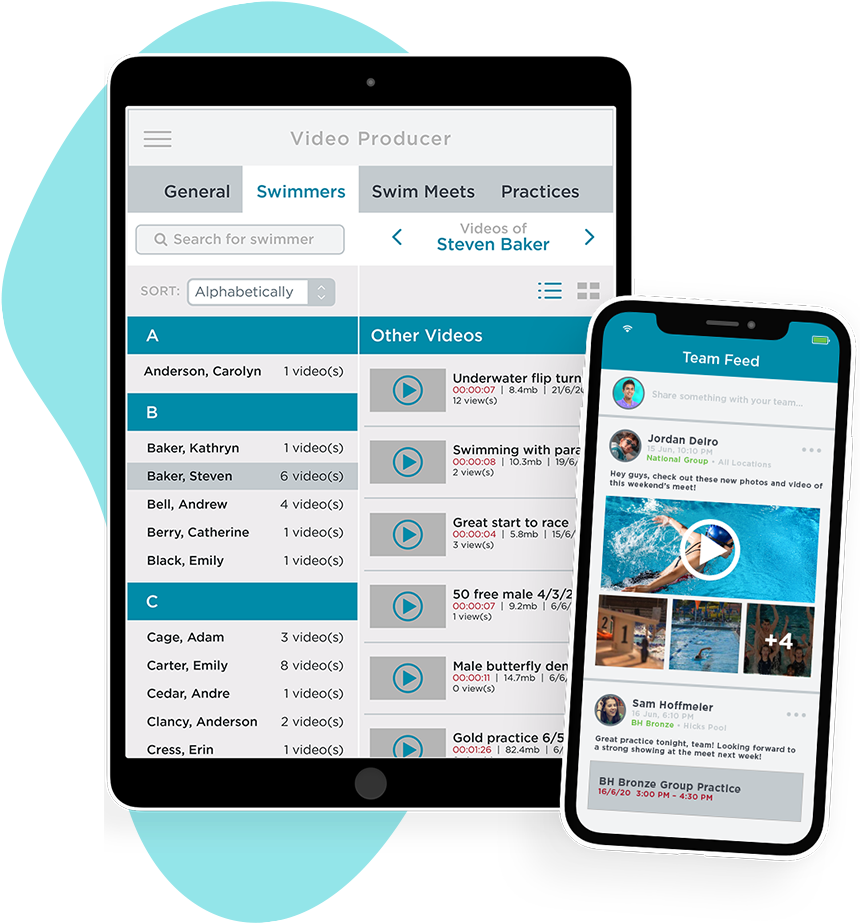
Thousand's of swim parents around the globe are experiencing new-found knowledge at swim meets, tracking attendance, viewing their childs best times and comparing them tolocal and national time standards, viewing news to your team's web site and viewing and signing up for jobs and all events on the team.

Completely Wireless and Easy-to-Use

All OnDeck requires is an iPhone, iPod Touch or iPad from Apple. OnDeck integrates and wirelessly synchronizes with SwimOffice Platform with the tap of a button. The ease-of-use and depth of information is unrivaled.

Empowering Parents to Easily Know More

Today, parents run around swim meets with limited or no information about what events their child is going to swim, they best times and how they are progressing to time standards. Add to all of this, the easing for parents to participate in the jobs sign-up process with OnDeck and without being in-front of a computer is is a game changer for team administrators and parents.

OnDeck OnDeck Parent is Free

All OnDeck products are included for Free and will empower to know more, in less time, all performed wirelessly while away from your computer. Enjoy!

Swim Meet Management

The Swim Meet Management function is the cornerstone of OnDeck, empowering a parent to time their children's races with ease.

As new swim meets are created in SwimOffice and synchronized with OnDeck, the information is instantly viewable. You'll what meets and events your kids are swimming.

All of the results information is synchronized to OnDeck, including prior splits. Time a race and with every tap of the lap button, OnDeck automatically calculates the split deltas showing if the your child is ahead or behind the previous split and running time.

The race ends, you can view the results of your child and compare the finish time to local and national time standards.

Want access to all meet results? OnDeck will Synchronize 24 months of meet histories plus many more thoughtful and time saving features.

Meet Results

Want to view results from all past meets, including non-sactioned meet? OnDeck Meet Results allows you to search by year to find a meet. Then simply tap on the meet to interactively search by athlete or race.

Finding meet results has never been easier. Best of all, adding new meets happens with each new sync. There's no guesswork or complexity.

Account Management

When you syncronize OnDeck with your team's data you'll see exactly what contact information your swim team has for you. If there are issues or changes needed you'll know to login into your team account to administer changes.

In your Account view, you also see all of your kids with their age and the roster group that they have been assigned. on a swimmer to view the last ten days of attendance and a full history of all meets swum with instant access to results.

Tap on one of your kids and you'll see a wealth of information.

Swimmer Management

OnDeck pulls the up-to-date swimmer database exactly as your swim team has you swimmers information.

After you've tapped on one of your childrens name, you'll see the last ten days of attendance [if your team is using OnDeck to track attenance] and a full history of all meets swum, best times with instant access to results and ability to compare times to local and national time standards, plus all future meets that the swimmer is declared to swim.

Team News

Easily access all of your team news. With everytime you syncronize, you're pulling in all the recent news that you team administrators have posted to your team website.

Make staying informed just that much easier!

Job Manager

Combined with TeamUnify's powerful online Volunteer Job sign-up system, parents around the globe continue to rejoice with the ease in which they can commit to jobs with their swim team.

With OnDeck Job Manager, the entire TeamUnify Volunteer job mangement process from sign-up to check-in is digital.

Your team administrators can now check you in into your job(s) or that indicate you did not show-up, add new slots for extra help required, add entirely new jobs, select one, many or all volunteers and send emails and/or boradcast text messages.

Everytime you syncronize, you'll pull in new events and jobs that you can wirelessly sign-up to help your team. After committing to jobs, you'll be reminded to save and syncronize then the job(s) will be all your's.

On the day of the event, when you login into OnDeck you'll be reminded that you have one or more scheduled jobs.

OnDeck Job Manager is a revolutionary tool that will help ease the process of committing to jobs for your team.

Splits Math

TeamUnify's Splits Math is a bit of a novelty. One that you may find more effective than novel.

Splits math allows you to set a distance and a goal time then displays the average 25, 50 and 100 page needed for your child swim the time. From here, tap on any distance to see what the finish time will be while the set time is maintained.

Imaging setting a goal time in the 200 Free of 1:55.00, your child will need to hold a 57.5 per 100 pace. Then tap on the 500 and the time wheels spin to 4:47.50, then tap the 1,000 and the wheels spin to 9:35.0, then tap on 1,650 and 15:48.75 is displayed. Just really easy and fun to plan your childs efforts, with or without them.

Or visa versa, set the 1,650 goal time and tap the distances and you see where you child will need to be at each distance.

It's great for when you're waiting for the next swim.

Preferences

We don't ever want to be called inflexible. That's why you'll find tons of controls to make OnDeck uniquely your own.

It starts with the ability to set the start screen so there's no searching for where you go most often, then re-order the toolbar and/or get rid of ones that you don't use all the time.

From there you can configure what distances you like to time races and select what time standards you want visible.

Select up to 50 different time standards from 59 Local LSC's, YMCA's and USA Swimming national time standards. If were missing any, just let us know and we'll add them. Once were done and you syncronize, the newly added standards will be availble for you to use.

 
Company
X

The genesis for TeamUnify started when Tom Fristoe became President of Tri Valley Masters Swim Team, as well, his association with Pleasanton Seahawks Swim Team, where his three daughters swam. Tom witnessed the repetitive tasks and issues that these volunteer run teams face everyday and how each struggled to effectively manage themselves. The core issue is that data and process was not centralized. In-turn the part-time administrators struggled to be effective. Everyone was working on separate tasks from separate islands of data. The scenario begged to be fixed by moving the tasks and information into one central location.

Tom and long-time friend Ming Lee started the long development process of engineering and then re-engineering the platform as they learned what worked best to enable the greatest productivity with the least amount of work. In the summer of 2007 TeamUnify moved from the "helping stage" and incorporated. The name TeamUnify was chosen because is represents our mission to unify a team together. In the process, we re-located to Bend, Oregon and opened our offices.

The full-time effort quickly delivered results. We raced from a handful of teams to 1,000+ and are now growing at nearly 40 new teams every month. Add to this, the revolutionary family of mobile products called OnDeck, TeamUnify continues to establish new standards for how swim teams, coaches and lessons programs will manage themselves more effectively with less effort. The result is a software platform, designed specifically for swimming, that delivers centralized business process optimization that's really easy-to-use. The platform is time tested, with intelligent automation, SwimOffice will help a swim team perform far better than today. See a Demo today.

TeamUnify's platform provides state-of-the-art security to ensure that your team member data is never compromised. At TeamUnify, we know that security is crucial. This is why it's a top priority. We devote significant resources to continually develop our world-class security infrastructure. The result: unsurpassed security and privacy of our customers' information.

With TeamUnify, you'll enjoy the protection and peace of mind that only our world-class security infrastructure can provide. In addition, TeamUnify is hosted in a secure server environment that uses a firewall and other advanced technology to prevent interference or access from outside intruders.

Physical Security
Our production equipment is collocated at a facility that provides 24-hour physical security, redundant electrical generators and other backup equipment designed to keep servers continually up and running.

Data Encryption
TeamUnify leverages the strongest encryption products to protect customer data and communications, including 128-bit Thawte SSL Certification. The lock icon in the browser indicates that data is fully shielded from access while in transit.

User Authentication
Users access TeamUnify only with a valid user name and password combination, which is encrypted via SSL while in transmission. Users are prevented from choosing weak or obvious passwords

Operating System Security
TeamUnify enforces tight operating system-level security by using a minimal number of access points to all production servers. We protect all operating system accounts with strong passwords, and production servers do not share a master password database. All operating systems are maintained at each vendor's recommended patch levels for security and are hardened by disabling and/or removing any unnecessary users, protocols, and processes.

Database Security
Whenever possible, database access is controlled at the operating system and database connection level for additional security. Access to production databases is limited to a number of points, and production databases do not share a master password database.

Server Management Security
All data entered into the TeamUnify application by a customer is owned by that customer. TeamUnify employees do not have direct access to the TeamUnify production equipment, except where necessary for system management, maintenance, monitoring and backups. The TeamUnify Engineering team provides all system management, maintenance, monitoring, and backups.

 
Video Testimonials
X
Loading playlist ...
 
Submit a Request for Help
X
  • Alternative Methods:
  • Email support@teamunify.com
  • Phone (541) 359-2635
 
Please enter your first name
 
Please enter your last name
 
Please enter your email address
 
Please enter your phone number
 
Please enter your team's website
  • Swim Office
  • OnDeck
  • TouchPad
  • TUMoney
  • TULessons
  • GetOutSwim.com
  • Billing
 
Please describe your issue
 

Schedule a Demonstration

 
Please enter your first name Please enter your last name
 
Please enter your email address
 
Please enter your phone number
 
Please enter comments about your interest
 
Please enter your team name
 
Please enter your team website
 
Please enter your team's city Please enter your team's state Please enter your team's zip code
 
Please select your type of team
 
Please enter the total team member count
  • Swim Office
  • OnDeck
  • TouchPad
  • TUMoney
  • TULessons
  • GetOutSwim.com
 
Please enter your product interest
 
 
X